You have probably heard about Cryptocurrencies like Bitcoin, Ethereum, XRP etc. They are thousands in number, among them Bitcoin, Ethereum and XRP are most mined cryptocurrencies. Cryptocurrencies are decentralized currency that can be accessible in unlimited amount by anyone who spends time and energy to mine it.
Cryptocurrencies are mined by solving some math problems and the problems are to find some HAS. If you got the HAS you got the Bitcoin. It takes millions of billions of attempt to find a single HAS. This is why Bitcoin mining costs lots of power and time. Same happens to your PC if some websites start to mine bitcoin using your CPU.
Websites can run JavaScript in your browser to mine cryptocurrencies and this is called Cryptojacking. There are many websites that run scripts in your browser and mines Bitcoin, XMR etc. One well known website is The Pirate Bay (TPB) that mines Monero (XMR). Last year they are testing cryptocurrencies mining and users found unnecessary overload and resource consumption in their PC. Also there are no option to opt-out mining process. Now again The Pirate Bay started mining but also provides opt-out option. Users can opt-out mining by using ad-blocker.
Similarly there are 2500+ websites that mines cryptocurrencies from their visitors. Some websites are
The Pirate Bay (http://thepiratebay.org)
Coinhive (https://coinhive.com)
Musicas (http://musicas.cc)
How to detect if a website is using your CPU?
It is very easy to detect if a website is mining cryptocurrencies using your PC’s CPU. You PC may become hot if mining script uses CPU heavily. In chrome press Shift + Esc to open task manager. In the task manger you can see which process is consuming your CPU.
How to avoid cryptojacking?
You can use extension that blocks cryptocurrency mining. minerBlock for Chrome, NoCoin for Chrome, NoScript Security Suite for Firefox can be used to avoid mining. Anti-WebMiner for Windows blocks mining scripts in all browser. Also installing anti-malware apps like MalwareBytes protects you from cryptojacking.
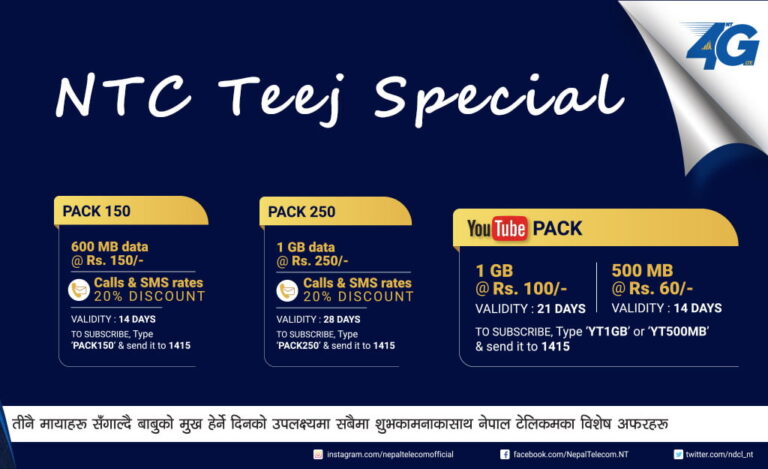
On the occasion of the Teej 2074, following data packages have been offered to NTC customers. These offers can be subscribed from 21st August to 4th September 2017. हरितालिका तीजको मंगलमय शुभकामना 1. YouTube Pack Following YouTube data pack have offered by NTC on the occasion of Teej 2074. Description Data Volume Price Inclusive of Taxes (NRs.) Package…
If you have set a cookie free domain or CDN and your fonts are broken and not showing then it might be due to Cross-Origin Resource Sharing (CORS). There should be a way to control what resources from my site is sharable and what are not. So that I can prevent content from my site…
There are many people and students searching for free domain for their projects, blogs and companies. .np ccTLD domain is completely free which is provided by Mercantile Communication aiming to expand IT field in Nepal. Anyone in Nepal can get free domain name but one must verify that he/she is Nepali citizen. Getting domain name…
Many don’t know about multiple YouTube channel feature but you can create 50 YouTube channels with a single Gmail account. You don’t have to create a different YouTube account for another channel. Creating a new YouTube channels requires a new brand account. Brand account is totally different from your personal YouTube channel similar as Facebook…
You are here to learn to host you domain name for free. Before starting get familiar with web servers and why it is needed to create a website. You may be thinking “Why I need this even I already have a domain name?”. Here is your answer. To make sure when you open a domain…
Creating a website means having a web address and to host webpages. Main thing for website is web hosting. There are many free and paid web hosting provider. You may use according to your choice and need. Basic types of websites are: Simple Wapsites: For the simple html website you need knowledge of html and…








Thanks for information ?
?